Showing posts with label iPad. Show all posts

Wednesday, June 8, 2011

Apple Products vs. Platform

Apple (AAPL) is an unusual stock for several reasons, not the least of which is the strong retail demand for the stock and a large contingent of customer-zealots who regularly worship at the altar of Steve Jobs.

Throw together the factors mentioned above, Apple’s history of important product announcements at major events and the return of Jobs and his unique talent for unveiling new cutting edge products and you get an interesting confluence of events – and expectations – at Monday’s Apple Worldwide Developers Conference.

These conferences are always abuzz with rumors and speculation about the next big thing that Apple is going to announce which will once again change the technology landscape. When is the next iPad coming? What new features will it include? When will the iPhone 5 be out? What will the next iOS and Mac OS operating systems do? What will be the implications for the devices they run? What is the iCloud and what does it mean?

In the end, those hoping for groundbreaking new products were disappointed. The iPad, iPhone, iPod, MacBook, iMac, Mac Pro, AppleTV, etc. were not on stage. Instead, the hardware devotees had to settle for innovations which were confined to operating systems enhancements and the iCloud – stuff you can’t wait in line for at an Apple store, take home and dazzle your friends and family with.

The irony is that the obsession with hardware misses the big point. New products are critical to Apple’s business, but at best it gets them a first mover advantage that is not guaranteed to endure. The truth is that from a strategic perspective the iCloud is much more important to Apple’s future than any new product, because the iCloud is a platform play that enhances the value of the full range of Apple products and services, including future products and services.

Let me illustrate this with a personal example. I have about a quarter of a century of PC-based computer experience. I probably owned two dozen laptops before I bought my first Apple product, an iPhone. When the iPad 2 came out, however, it was easy for me to expand my stable of Apple products. Now that I am habituated to iTunes and the App Store, it is easier for me to contemplate something like the MacBook. With all of these devices seamlessly sharing data in the background on the iCloud, the data argument for expanding my suite of Apple products becomes that much more compelling. It is a similar story for my wife, who only recently began playing with her first Apple product, the iPad. She has been so completely won over that an iPod will soon follow and then I’m betting an iPhone will be too difficult to ignore. By the time she gets around to replacing her laptop, I’m fairly sure the MacBook Air will win her over – even if she doesn’t even know what it is right now.

I suspect that something similar is in the process of happening across the globe. Many of us who have spent the majority of our careers in a PC-centric corporate environment have often found Apple products to be too much of a compatibility issue to be worth the trouble. They have been relegated to toy status rather than serving as our our central computing devices. The iCloud gives Apple a chance to convert those PC cling-ons not only to exciting Apple products and services, but to a iCloud data world that could be a platform revolution. Device-independent data sharing is just around the corner and Microsoft (MSFT), Google (GOOG) and their ilk better have a strong alternative – and soon.

As for AAPL stock, it is down about 3% since Steve Jobs took the stage on Monday. Savvy investors should be thinking more about Brian Arthur’s Increasing Returns and the New World of Business and less about the timing of new product announcements.
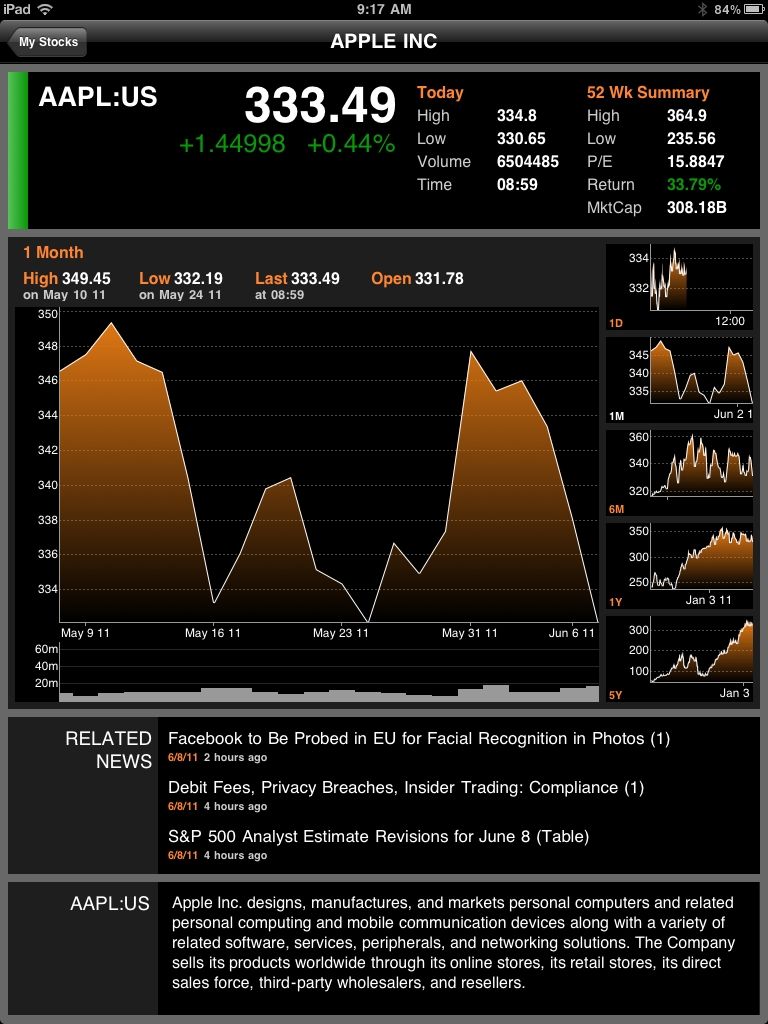


[graphic: Bloomberg for iPad]

Disclosure(s):
long AAPL at time of writing

Tuesday, April 26, 2011

A Trio of Niche iPad Financial Markets Apps

In my ongoing review of financial markets apps for iPad, there are several which defy easy categorization or appear to be the only entrants in their respective categories. Today I look at three such apps:

  1. ETFdb

  2. CBOE

  3. WolframAlpha
All three apps offer very different content that is aimed at users who focus on a specific niche of the investing world.

In the case of ETFdb, the focus is on ETFs and the app carries over much of the content from the popular ETFdb.com web site. The app has two main pieces of functionality: an ETF screener and ETFdb news articles. The screener is somewhat basic and the articles appear in chronological order, what it makes it difficult to keep track of specific sectors or asset classes in real-time. Still, when one drills down from the screening tool, some excellent ETF (and ETN) content is unveiled. The profile pages (see graphic below) include eight separate tabs that are filled with information, including data on holdings, fund performance, charts, technical analysis details, related news, and a link to the issuer home page, where one can generally find a prospectus, dividend information and other details. In short, ETFdb is an excellent tool for researching individual ETFs, though its screening and news functionality could use some enhancements.

The CBOE app covers a different slice or slices of the investment world. It includes general market data (indices, most active stocks, most active options, etc.), quotes, news and a watchlist function where users can pull up options chains and access data and charts for every option associated with a particular underlying. The CBOE app also has some high quality educational content from the Options Institute. Here one can learn the basics of options strategies, take an online course or review a variety of additional educational materials from the CBOE’s educational arm. CBOE TV content is also available on the app. These include videos on breaking news and timely subjects as well as more general background material. Last but not least, the CBOE app has a link to the CBOE twitter feed, which highlights significant options transactions, breaking news and new content on the CBOE web site. For those who are interested in options and particularly options education, the CBOE iPad app should be a high priority.

I found WolframAlpha to be the most interesting and difficult to describe of the three apps. This is partly because it had been awhile since I visited the WolframAlpha web site, but also because the app is such a superb fit for the iPad form factor and display. A self-styled “computational knowledge engine,” think of WolframAlpha as Wikipedia on steroids (lots of them), tied to a world class mathematical brain that effortlessly conveys the nuances of complex subjects with the help of an extremely deft use of statistics and graphics. Yes, it is an elegant nerd. Type in “VIX’ at the web site or in the iPad and you can quickly see what VIX is all about. Try “iron condor option” and you can quickly visualize and internalize much of what that strategy is all about. Tickers work too, though not all of them. Enter “GOOG” and the app (or web site) will pull some interesting stock data and graphics for Google. Unfortunately, there is no such luck with “VXX” and the rest of the VIX exchange-traded products. Unlike the other apps review above and in previous posts, the iPad version of WolframAlpha is not free, but for $1.99 I have little doubt that users will find a way to get their money’s worth out of this application.

In sum, these are three apps that cover a specific aspect of the investment universe and do so in an attractive manner. Investors interested in ETFs, options or computational data and graphics are encouraged to take each of these three apps for a test drive.

Related posts:

[graphic: ETF db]

Disclosure(s): short VXX at time of writing; the CBOE is an advertiser on VIX and More

Thursday, April 21, 2011

iPad Financial Markets Apps from FOX, Thomson Reuters and NASDAQ OMX

In reviewing broad-based financial markets news and data apps for iPad, I began with the free apps, which include the high quality CNBC Real-Time for the iPad and runner up, Bloomberg for iPad – both of which I reviewed earlier this month.

A second tier (perhaps too harsh of a characterization) of free apps in the same broad-based financial markets space that I experimented with include one app from FOX, two from Thomson Reuters and a more specialized app from the NASDAQ OMX.

My favorite of these near misses is FOX Business for iPad, which is similar to the CNBC and Bloomberg apps in that its focus is on news, video content and market data. The site is attractively organized, has a large amount of up-to-date video content, includes a portfolio tracker function and a FOX Business Minute button which enables users to quickly scan the day’s headlines and link to related video. In sum, the feature-filled FOX app is a strong competitor to CNBC and Bloomberg and will probably be preferred by some to its two main competitors. In the end I am counting it as a near miss because of some content organization and graphics issues. I was also disappointed that FOX Business for iPad did not have the XIV ETF in its database and was therefore unable to add it to my portfolio.

The two Thomson Reuters products struck me as slightly too news and text-centric for my taste. My favorite of the two is Reuters News Pro for iPad, which has a strong global focus in terms of financial and non-financial news. It also puts more emphasis on global markets and currencies than the competition. While this app lacks a formal portfolio management function, it does have an attractive portfolio monitoring module, Stocks, that makes it easy to track various holdings in terms of news and performance, along with charts. For the international investor, I can certainly see where News Pro might supplement or in some cases even win out over the more U.S.-centric CNBC, Bloomberg and FOX apps. I am still not sure exactly which audience the Thomson Reuters Marketboard app is targeting, though it looks as if this app attempts to leverage and extend the functionality and data available to Thomson ONE account holders. In some respects the app strikes me as a potential companion to News Pro. Again there is a strong global data to the content, but the emphasis is more on headlines and snapshots than detailed content. If you are interested in research, company reports and corporate events – and particularly if you are an existing Thomson ONE subscriber – Marketboard should have a good deal of appeal.

Of all the apps in this group that I wanted to get excited about, at the top of my list was QFolio HD – the NASDAQ OMX Portfolio Manager. While apps from individual brokers are great for tracking broker-specific holdings, the functionality I have yet to find is one that deftly aggregates portfolio information across multiple brokers and asset classes. Unfortunately QFolio did not live up to my expectations, though not for lack of trying.

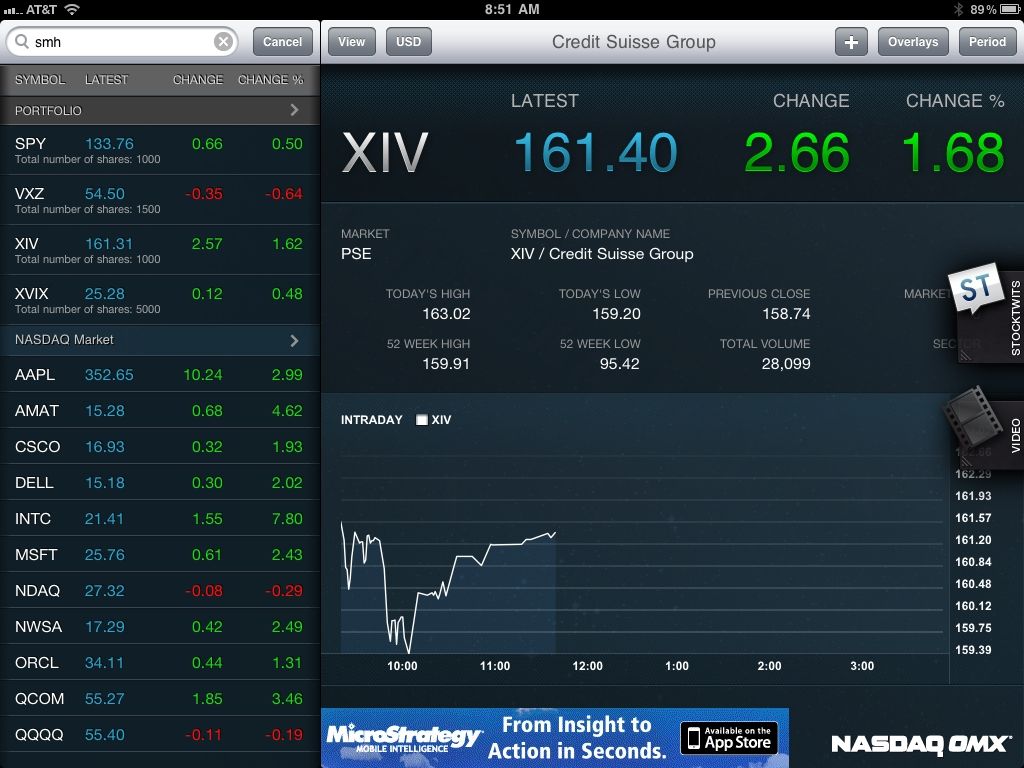
There are three main screens for QFolio: Portfolio; Company Details; and Market Mind. The Portfolio screen includes aggregated portfolio information with total portfolio value. I was disappointed by the fact that the overview screen only has sufficient real estate to display four holdings on one screen at a glance. While scrolling affords quick access to the full list of holdings, it would be nice to have more holdings and less information available on one screen, ideally with this information customizable by the user. The graphic below is a snapshot [with fictitious portfolio data -Ed] of the Company Details data display, which includes links to a StockTwits feed as well as a StockTwits TV video feed. Last but not least is the Market Mind feature, which turns out to be the best way to monitor changes in prices for five or more holdings at a time. Here one can monitor prices, view intraday charts and even view time and sales data. While the current incarnation of QFolio is certainly an adequate portfolio management tool, it has the potential to be even more. I look forward to seeing how this app evolves over time.

Related posts:


[graphic: QFolio/NASDAQ OMX]

Disclosure(s): long XIV at time of writing

Thursday, April 7, 2011

Bloomberg for the iPad

In my ongoing look at trading apps for the iPad, I have elected to initially focus on the ‘big media’ all-in-one apps. I began with an overview of the space and some initial thoughts. Yesterday I offered some more detailed thoughts on CNBC Real-Time for the iPad, and today I turn to CNBC’s main competitor, Bloomberg.

To reiterate from earlier in the week, there are actually two different apps from Bloomberg:

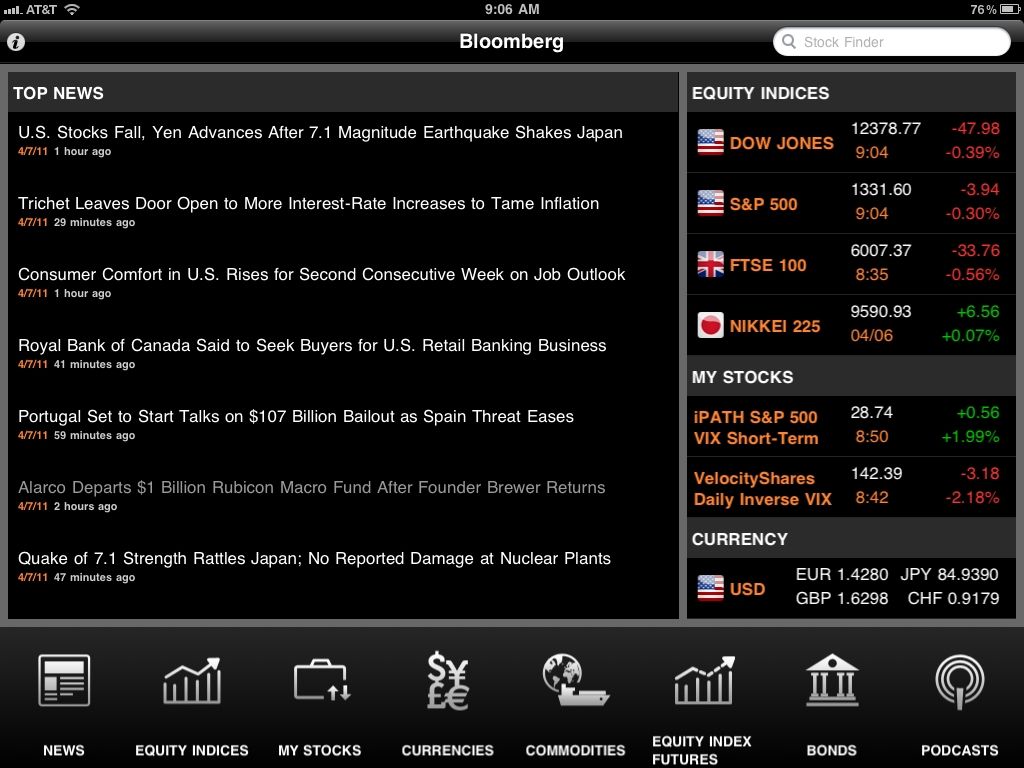
Bloomberg for iPad is designed as a news-first application, which is evident from the graphic below – a screen capture of the home page for Bloomberg for iPad. On the plus side, the home page is a healthy blend of news, market data and watch list information. On the minus side, this page is not configurable, save for the ability to edit the top two “My Stocks” entries in a separate module.

The menu on the bottom outlines the full range of functionality. Charts are available for equity indices and stocks, but not for currencies, commodities or equity index futures. While those charts are attractive, the user can only customize the look back period (1d, 1m, 6m, 1y and 5y) and not add any technical indicators. No indicators are included with the charts, not even moving averages.

Where Bloomberg does trump CNBC Real-Time is with its portfolio monitoring functionality. Here users can enter share quantities and cost basis information in order to monitor profit and loss information on a security by security basis. True to its name, this My Stocks feature is limited to equities (and ETFs) and does not accommodate futures or other types of securities. I was also a little disappointed that there is no functionality to display total portfolio profit and loss for the current trading day or any historical period. Finally, it is important to note that while index quotes are in real-time, quotes for individual securities are delayed 15-20 minutes.

From a video perspective, Bloomberg does have a wide variety of podcasts available. Comparing these to the CNBC Real-Time video content, my sense is that CNBC has much more video content available and also a much larger library of content that is from the current trading day.

All things considered, I like the Bloomberg app and find it the news and My Stocks modules to be helpful, but I also see areas where Bloomberg needs to make some enhancements in order to put its product on par with CNBC Real-Time.

That being said, I would imagine that Bloomberg Anywhere for iPad, which is intended to provide a mobile version of the full Bloomberg terminal, would probably be the undisputed content and functionality king in this space. Not having had experience with this app, I will leave it for readers to chime in with their comments.

Next up: QFolio HD – the NASDAQ OMX Portfolio Manager

Related posts:

[graphic: Bloomberg for iPad]

Disclosure(s): none

Wednesday, April 6, 2011

CNBC Real-Time for the iPad

Since there seems to be such a large supply-demand imbalance (little supply, lots of demand) regarding information on trading apps for the iPad, I have decided to devote a little time to drilling down on some of these apps.

First up is CNBC Real-Time for iPad, which offers a large amount of content ranging from market data and graphics to news and videos. For the investor whose primary goal is to monitor the markets when he or she is not at a desk, this app is an excellent choice. The market data goes beyond just stocks and the major market equity indices and includes commodities, currencies and bonds. As the app name indicates, quotes are in real-time and even include a separate Pre-Markets tab with equity futures data. The graphic below shows the menu structure and various tabs available. In the screen capture, I have elected to highlight the Markets > Movers > S&P data. A similar tab, Dow Impact, ranks the five stocks with the largest positive impact and negative daily impact on the Dow Jones Industrial Average, along with the point impact for each stock.

Looking at other features, the news and video content are what you would expect from CNBC: high quality, voluminous and current.

For portfolio monitoring, the My Stocks content pulls charts, news and videos together for each watch list entry. The charts use real-time NASDAQ and NYSE data and make it easy to compare a security to a variety of indices, as well as utilize technical indicators such as moving averages (SMA, EMA, WMA), Bollinger bands, MACD, RSI, DMI and a handful of others. In short, the market technician is well-served here, though it would be nice to have some ability to customize the default settings on the technical indicators.  One thing that is lacking is an ability to enter share and cost basis information so that investors can easily track changes to their portfolio in dollar terms across the full range of their holdings.

Even with these small caveats, all in all the CNBC Real-Time for iPad is an excellent ‘do everything’ app for those who wish to monitor the markets remotely and do not need to trade directly from their market monitor platform. Of course, there is nothing stopping this person from keeping their favorite broker-based application open at the same time and becoming an opportunistic trader as well.

Related posts:


[graphic: CNBC Real-Time for iPad]

Disclosure(s): none

Tuesday, April 5, 2011

Initial Thoughts on Using the iPad for Trading

Thanks to all who offered up some comments on their experiences using the iPad for trading. Today I will summarize the feedback I have received from other traders, then comment on my own initial experiences with the iPad 2.

Traders express positive feelings about four iPad apps in particular. Two of the four were broker applications:

  • thinkorswim mobile – now that thinkorswim and T.D. Ameritrade are finally showing some signs of integration, the TOS and TDA apps are surprisingly similar
  • Mobile TWS – TWS is the Trader WorkStation app from Interactive Brokers
Two others were general applications that are aimed in replicating desktop functionality:
  • LogMeIn Ignition – According to the company web site, and confirmed by several users, “One touch on your iPhone or iPad lets you remotely access your computers anywhere, anytime and manage your files on the go. Directly control your desktop as if you’re sitting in front of it, access your computer applications as if they were on your iPad, and view or manage files directly from your iPad/iPhone.”
  • Air Display – works like a wireless monitor
My experiences with the iPad encompass limited exploratory work over the course of two trading sessions, but I thought I would share my thoughts nonetheless.

As a desktop complement, I find that the iPad has limited utility. Perhaps the largest value would be in offloading some peripheral trading or general computing functionality, such as monitoring news events and the like.

As a mobile computing device, I believe the iPad has considerable potential, not just for news, but for analysis, trade execution, position monitoring and the like. I found the thinkorswim and Interactive Brokers trading apps to be excellent and I was also pleasantly surprised by the Fidelity iPad app, which I would put at least on par with the TOS and IB apps as my top three broker apps that I have examined.

As an options trader, I also looked briefly at the apps from optionsXpress and OptionsHouse and while these are fine initial efforts, in my opinion, they have a way to go before they can be considered in the same league as the three mentioned above.

CNBC (CNBC Real Time) and Bloomberg (Bloomberg for iPad and Bloomberg Anywhere, which is the full Bloomberg terminal) also have apps. I experimented with CNBC and Bloomberg for iPad and came away with the impression that these are both adequate general-purpose applications, but traders will likely prefer the offerings from their brokers, including those who are looking for better charting applications.

I have done very little trading with my iPhone over the years, but it does help me keep on top of any sort of extreme market conditions when I am traveling, but it always feels as if I am about 95% in the dark in terms of news and what is really moving the markets. With the iPad, I can see iPad trading as being almost comparable to laptop-based trading, but in an more transportable form factor and perhaps a simpler and more direct user interface.

I eagerly await the next generation of trading apps.

Feel free to add your own experiences in the comments below and/or suggest some additional iPad trading apps.

Related posts:
Disclosure(s): none

Thursday, March 31, 2011

Using the iPad for Trading

Unless FedEx (FDX) and Apple (AAPL) have their facts wrong, today the iPad 2 will arrive at my door step.

Since I passed on the iPad 1, this will be my first chance to play with something that I have no idea what I will ultimately end up interacting with. This could turn out to be new computer in a different form factor a toy or anything in between.

While I will try to integrate the iPad into my trading, I am not sure how this is going to happen either. I am not a big fan of using my iPhone for trading unless my environment does not allow any alternatives. As for the iPad, I can imagine it as a complement to my main trading setup, an excellent portable alternative to the iPhone and perhaps filling a bunch of other roles that I am not able to anticipate.

I would love hearing from other traders about how they use the iPad in their trading, whether it means news, charts, quotes, trade execution or whatever. If I get enough responses of note – either here or on Twitter (http://www.twitter.com/VIXandMore) – I will summarize the information in a future post and add in my own experiences as well.

Related posts:

Disclosure(s): none

DISCLAIMER: "VIX®" is a trademark of Chicago Board Options Exchange, Incorporated. Chicago Board Options Exchange, Incorporated is not affiliated with this website or this website's owner's or operators. CBOE assumes no responsibility for the accuracy or completeness or any other aspect of any content posted on this website by its operator or any third party. All content on this site is provided for informational and entertainment purposes only and is not intended as advice to buy or sell any securities. Stocks are difficult to trade; options are even harder. When it comes to VIX derivatives, don't fall into the trap of thinking that just because you can ride a horse, you can ride an alligator. Please do your own homework and accept full responsibility for any investment decisions you make. No content on this site can be used for commercial purposes without the prior written permission of the author. Copyright © 2007-2023 Bill Luby. All rights reserved.
 
Web Analytics